

Build Consistent Reusable AI Characters
Create dedicated character profiles from reference photos so every future portrait, ad shot, or story frame looks unmistakably like the same person.
Adjust controls here — clicking upload or generate opens this tool in Workspace.
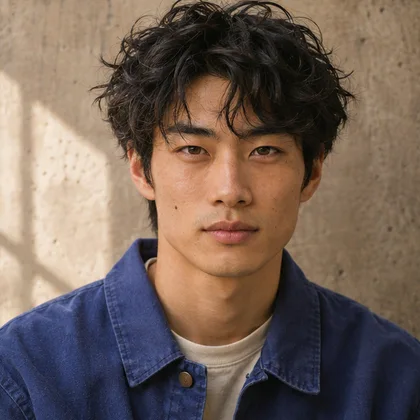
How it works
Prepare clear photos
Upload varied angles and expressions following the built-in quality guide.
Create character profile
Name your character and train an identity model with transparent credit pricing.
Generate across any scene
Reuse your character in prompts, Photodump series, and cinematic shots.
Key capabilities
Built-in photo quality checks
Automatic resolution checks ensure crisp training inputs before you spend credits.
Cross-tool reuse
Use trained identities across standard image creation, cinematic mode, and Photodump.
Private account library
All identities stay scoped to your account and can be managed or deleted anytime.
Ready to try it on your own media?
Launch the Prori workspace to run this tool with live previews, credit estimates, and full generation history.
Pick your plan
Unlock every Prori AI image, video, and creative workflow with transparent monthly or yearly credits.
Nano
-20%The basics to get started.
$96 billed yearly
- Core creative tools & starter credit pool
- Up to 1 connected social account
Plus
Most popularYour everyday Agent for social media and growth.
$204 billed yearly
- All image & video models (Nano Banana Pro, GPT Image, Seedream, Veo, Kling, Seedance)
- Up to 30s videos with native audio
- Up to 2 connected social accounts
- Social growth & multi-platform publishing tools
Pro
-14%More room for your most demanding workflows.
$504 billed yearly
- All image & video models (Nano Banana Pro, GPT Image, Seedream, Veo, Kling, Seedance)
- Up to 30s videos with native audio
- Up to 5 connected social accounts
- High-volume quota for heavy production & teams
Max
-15%More room for your most demanding workflows.
$1,008 billed yearly
- All image & video models (Nano Banana Pro, GPT Image, Seedream, Veo, Kling, Seedance)
- Up to 30s videos with native audio
- Up to 6 connected social accounts
- High-volume quota for heavy production & teams
Frequently asked questions
How many reference photos do I need?
The studio displays the exact minimum and maximum photo counts for each training engine before you submit.
What photos work best for character consistency?
Clear solo portraits with varied angles, natural lighting, and unobstructed faces work best.
Where can I use a finished character?
Once ready, select it directly inside AI Image, Photodump, and Cinematic Cameras.
More tools in this studio
Explore more AI features
- AI Face Swap
- AI Character Swap
- AI Image Relight
- AI Background Remover
- AI Remove Text
- AI Photo Enhance
- AI Image Upscale
- AI Inpaint & Layers
- AI Photodump
- Cinematic Cameras
- AI Image Canvas
- Thumbnail Spotlight
- Story Atlas
- Meme Riff
- AI Shorts Studio
- Cinema Studio
- Talking Portrait
- Narration Studio
- 3D Scenes
- Explainer Video
- Creative Video Canvas
- Mixed Media Video
- AI Video Editor
- AI Video Upscale
- AI Video Reframe
- Link to Ad
- Video Color Palette
- Draw to Video
- Draw to Edit Video
- Manga Master
- AI Influencer
- Visual Effects
- Content Factory
- Motion Control
- RiftCut