
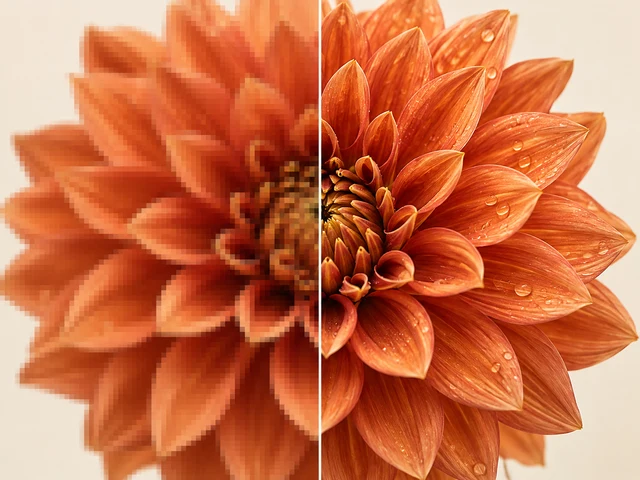
원클릭으로 선명한 화질과 디테일 복원
Recover crisp textures, remove compression artifacts and noise, and balance flat lighting while keeping your original composition untouched.
설정을 미리 체험해 보세요. 업로드나 생성 클릭 시 워크스페이스로 이동합니다.
사용 방법
Add your photo
Upload, drop, or paste any low-clarity or compressed image.
Review estimate
See the exact credit cost before running.
Enhance & export
Inspect and download the restored image from the right-side drawer.
핵심 기능
Artifact & noise cleanup
Strips JPEG blocking, grain, and motion softness cleanly.
Faithful detail recovery
Sharpens micro-texture without hallucinating new objects or restyling.
Balanced tone & contrast
Lifts dull, flat photos into crisp publish-ready visuals.
내 파일로 바로 사용해 볼까요?
Prori 워크스페이스에서 실시간 미리보기, 투명한 크레딧 견적, 생성 기록과 함께 바로 실행할 수 있습니다.
플랜 선택
하나의 계정으로 Prori의 모든 AI 이미지·비디오 도구와 워크플로우를 이용하세요.
Nano
-20%The basics to get started.
연간 일시불 $96
- 핵심 크리에이티브 도구 및 입문용 크레딧 제공
- 최대 1개 소셜 계정 연결
Plus
가장 인기Your everyday Agent for social media and growth.
연간 일시불 $204
- 모든 이미지·비디오 모델 지원 (Nano Banana Pro, GPT Image, Seedream, Veo, Kling, Seedance 등)
- 네이티브 오디오 포함 최대 30초 비디오 생성
- 최대 2개 소셜 계정 연결
- 다중 소셜 플랫폼 운영 및 성장 워크플로우 지원
Pro
-14%More room for your most demanding workflows.
연간 일시불 $504
- 모든 이미지·비디오 모델 지원 (Nano Banana Pro, GPT Image, Seedream, Veo, Kling, Seedance 등)
- 네이티브 오디오 포함 최대 30초 비디오 생성
- 최대 5개 소셜 계정 연결
- 대량 제작 및 팀 워크플로우를 위한 넉넉한 한도
Max
-15%More room for your most demanding workflows.
연간 일시불 $1,008
- 모든 이미지·비디오 모델 지원 (Nano Banana Pro, GPT Image, Seedream, Veo, Kling, Seedance 등)
- 네이티브 오디오 포함 최대 30초 비디오 생성
- 최대 6개 소셜 계정 연결
- 대량 제작 및 팀 워크플로우를 위한 넉넉한 한도
자주 묻는 질문
Will Enhance change the content of my photo?
No. Composition, framing, colors, and subjects stay identical—only clarity, texture, and lighting balance improve.
When should I use Enhance vs Upscale?
Use Enhance to rescue noisy or flat lighting photos quickly; use Upscale when you need specific higher output resolution multipliers.
How fast is the workflow?
Upload or paste, click once, and track live progress in the right-side generations drawer.
관련 도구
더 많은 AI 기능 둘러보기
- AI 얼굴 바꾸기
- 캐릭터 교체
- AI 리라이트
- AI 배경 제거
- AI 텍스트 제거
- AI 이미지 업스케일
- AI 인페인트 & 레이어
- AI 포토덤프
- 캐릭터 프로필
- 시네마틱 카메라
- AI 이미지 캔버스
- 썸네일 스튜디오
- 스토리 아틀라스
- Meme Riff 밈 생성기
- 쇼츠 스튜디오
- 시네마 스튜디오
- 토킹 포트레이트
- 내레이션 스튜디오
- 3D 씬 비디오
- 설명 영상 제작
- 크리에이티브 캔버스
- 믹스드 미디어 영상
- AI 비디오 편집
- AI 비디오 업스케일
- AI 비디오 리프레임
- 링크로 광고 영상
- 비디오 컬러 팔레트
- 드로우 투 비디오
- 드로우 비디오 편집
- 만화 마스터
- AI 인플루언서
- 비디오 이펙트
- 콘텐츠 팩토리
- 모션 컨트롤
- RiftCut