

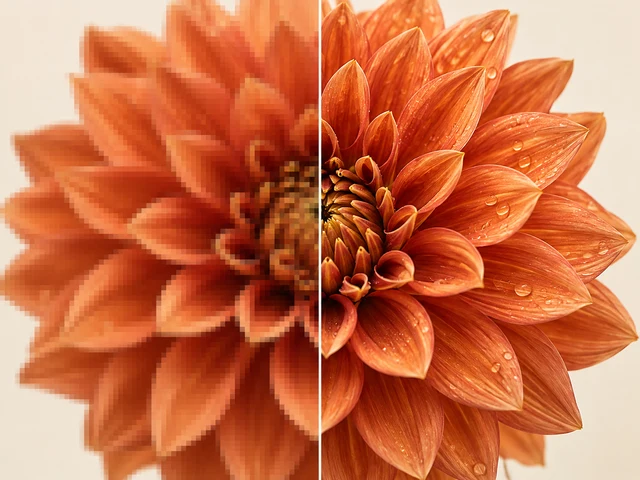
ワンクリックで鮮明さと質感を復元
Recover crisp textures, remove compression artifacts and noise, and balance flat lighting while keeping your original composition untouched.
設定を試せます。アップロードまたは生成でワークスペースが開きます。
使い方
Add your photo
Upload, drop, or paste any low-clarity or compressed image.
Review estimate
See the exact credit cost before running.
Enhance & export
Inspect and download the restored image from the right-side drawer.
主な機能
Artifact & noise cleanup
Strips JPEG blocking, grain, and motion softness cleanly.
Faithful detail recovery
Sharpens micro-texture without hallucinating new objects or restyling.
Balanced tone & contrast
Lifts dull, flat photos into crisp publish-ready visuals.
自分の素材で試してみませんか?
Prori ワークスペースでリアルタイムプレビューやクレジット見積もり付きですぐに実行できます。
プランを選択
1つのアカウントで Prori の AI 画像・動画ツールをすべて利用可能。月額または年額で透明なクレジット管理。
Nano
-20%The basics to get started.
年額一括 $96
- 基本クリエイティブツール&スタータークレジット
- 最大 1 個の SNS アカウントを管理
Plus
人気 No.1Your everyday Agent for social media and growth.
年額一括 $204
- 全画像・動画モデル対応(Nano Banana Pro, GPT Image, Seedream, Veo, Kling, Seedance 等)
- 最大 30 秒・ネイティブ音声付き動画生成
- 最大 2 個の SNS アカウントを管理
- SNS 運用・マルチプラットフォーム成長ワークフロー対応
Pro
-14%More room for your most demanding workflows.
年額一括 $504
- 全画像・動画モデル対応(Nano Banana Pro, GPT Image, Seedream, Veo, Kling, Seedance 等)
- 最大 30 秒・ネイティブ音声付き動画生成
- 最大 5 個の SNS アカウントを管理
- 大量制作・チーム向けの大容量クレジット枠
Max
-15%More room for your most demanding workflows.
年額一括 $1,008
- 全画像・動画モデル対応(Nano Banana Pro, GPT Image, Seedream, Veo, Kling, Seedance 等)
- 最大 30 秒・ネイティブ音声付き動画生成
- 最大 6 個の SNS アカウントを管理
- 大量制作・チーム向けの大容量クレジット枠
よくある質問
Will Enhance change the content of my photo?
No. Composition, framing, colors, and subjects stay identical—only clarity, texture, and lighting balance improve.
When should I use Enhance vs Upscale?
Use Enhance to rescue noisy or flat lighting photos quickly; use Upscale when you need specific higher output resolution multipliers.
How fast is the workflow?
Upload or paste, click once, and track live progress in the right-side generations drawer.
関連ツール

その他の AI 機能を見る
- AI 顔入れ替え
- キャラクター入れ替え
- AI リライト
- AI 背景透過・削除
- AI 文字消し
- AI 画像アップスケール
- AI インペイント&レイヤー
- AI フォトダンプ
- キャラクター作成
- シネマティックカメラ
- AI 画像キャンバス
- サムネイルスタジオ
- ストーリーアトラス
- Meme Riff ミーム生成
- ショート動画スタジオ
- シネマスタジオ
- トーキングポートレート
- ナレーションスタジオ
- 3D シーン動画
- 解説動画メーカー
- クリエイティブキャンバス
- ミクストメディア動画
- AI 動画編集
- AI 動画アップスケール
- AI 動画リフレーム
- URL から広告動画
- 動画カラーパレット
- スケッチから動画
- スケッチ動画編集
- マンガマスター
- AI インフルエンサー
- ビジュアルエフェクト
- コンテンツファクトリー
- モーション制御
- RiftCut